hurozo Attend
First step

Set up your first agency

Create an agency, add workers, attach canon, and assign its first task.

Worker Tools

Manage worker

Tune the role and tools for this agency teammate. Graph wiring stays internal.

Tools

Loading...

Worker View

No tools selected
Team worker Untitled Agent Describe what this agent should do. HurozoAgent

Worker Chat

Describe the worker you want to add to this team, or what you want to change.
Draft JSON
{}

Teams

Teams are managed from Agency.

Connectors

Connectors

Connect services for the current agency

Loading connectors…

Agency

Team workspace

Planning

Filters

Build

Runs

Execution activity

Runs

Inspect Worker work, tool calls, reasoning summaries, and failures.

Select a run to inspect its activity.

Files

Agency files

    Documentation

    Contact Us

    New message

    To: hi@hurozo.com

    Hurozo CLI

    Terminal-first agent work

    Hurozo CLI

    The same Hurozo agent runtime, model routes, approvals, and connected tools from your shell.

    Install with Homebrew
    brew tap hurozo/hurozo-cli
    brew install hurozo-cli
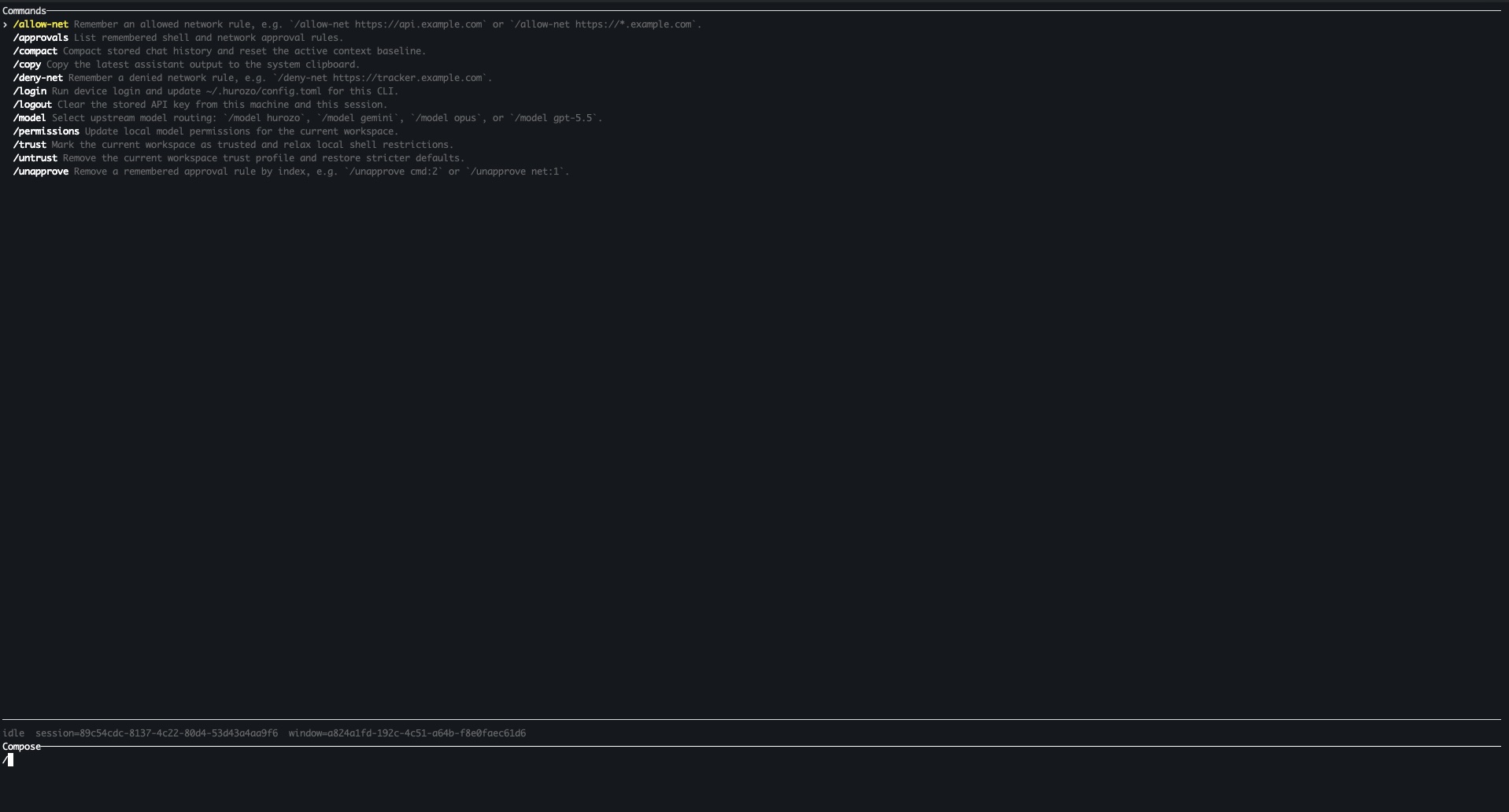
    Hurozo CLI running in a terminal

    Model routing

    Switch between Hurozo, Gemini, Opus, and ChatGPT-backed routes when your account is configured for them.

    Approvals

    Review tool permissions from the terminal and keep remembered decisions scoped to the exact operation.

    Second opinions

    Use model arbitration to ask another available route for critique, checks, or a different perspective.

    Connected tools

    Use the same account-backed connectors and skills available in Hurozo's desktop and WebCLI experiences.

    First run

    After installation, run hurozo. The CLI walks you through account authentication and any model-specific sign-in or secret setup that your selected route requires.

    Hurozo SDK

    Python agent invocation

    Hurozo SDK

    Invoke saved Hurozo agents from Python using the same API tokens, inputs, outputs, and runtime routing used by Agent Builder.

    Install
    pip install hurozo
    getting_started.pyPython
    import json
    import os
    
    from hurozo import Agent
    
    os.environ["HUROZO_API_TOKEN"] = "YOUR_API_TOKEN"
    agent = Agent("sentiment-analyser")
    inputs = {
        "prompt": "Analyze sentiment and return JSON. Text:",
        "input": "I am very happy!",
    }
    
    result = agent.run(inputs)
    print(json.dumps(result, indent=2))

    Agent lookup

    Use an agent name, saved agent id, or agent UUID. The SDK resolves the correct execution target.

    Structured inputs

    Pass a Python dictionary matching the API input keys exposed by the saved workflow.

    Hosted runtime

    Runs against Hurozo's execution endpoint, including model routing, tools, outputs, and usage accounting.

    Token setup

    Create an API token from Account settings -> Manage API Tokens, then set it as HUROZO_API_TOKEN before running scripts.

    Intake

    Start on the one that needs you, not the wall of hundreds.

    Hundreds land overnight, sorted by nobody. Morning Triage reads the whole queue, sorts it by topic and urgency, and puts the one that should reach a person on top. It sends nothing.

    The wall, on your data

    See your queue arrive sorted, with the risky one pulled out.

    One overnight queue, read and ordered. Most of it routine, and the one that needs you, up top.

    Attend · your support deskobserve mode · sample data
    47 landed overnight, sorted1 needs you
    "Third time asking. I am about to cancel."reach a person
    Where is my order #4471?order
    Can you resend my invoice?billing
    Change my delivery datedelivery
    Is the navy jacket back in stock?product
    Reset my passwordaccount
    + 41 more, sorted and quiet
    read the whole queuesorted by topicscored urgencyflagged the risksent nothinglogged

    One sample queue, in observe mode on sample data. The background behind the window is not real data. On your own tickets, the crew reads the whole wall, sorts it, and surfaces the one that should reach a person. It sends nothing on its own.

    How Morning Triage works

    It reads the whole wall, and puts your call on top.

    A Sorter, with the Logger writing down every step. It sorts by topic, urgency, and risk, and sends nothing. The reply jobs come after, each held for you.

    It reads the whole wall, not just the top.
    Every ticket sorted by topic, urgency, and risk before you touch it, so nothing important is sitting on page four at 9am.
    this morning
    47 read and sortedovernight
    By topic and urgencyordered
    It finds the one a rule would bury.
    The repeat contact, the cancel intent, the VIP, surfaced even when the words look calm. The quiet risk a keyword filter walks past.
    it caught
    Third contact, cancel intentrisk
    Pulled to the topfor you
    It sends nothing, and leaves your call on top.
    Triage never replies on its own. It hands you a sorted queue with the one that needs a person first, and the reason it flagged it.
    your call
    One flagged for you
    Nothing sentlogged
    Why it matters

    The queue sorted by nobody is where the one that matters hides. Arrive to it sorted, with the risky one on top, and you spend your morning on the customer who needs you, not on triage.

    Questions

    What support leads ask about triage.

    Does it reply to anything itself?
    No. Triage sorts and flags, and sends nothing. The reply jobs come after, each drafted and held for your approval.
    What if it mis-sorts an urgent one?
    It errs toward surfacing. Anything ambiguous or risky is flagged for a person, not buried. You tune the rules for what counts as urgent.
    How does it decide what needs a person?
    Topic, urgency, sentiment, repeat contact, VIP status, and the rules you set. You decide what earns a spot at the top of the queue.
    Does it work across channels?
    Yes. Email, chat, and WhatsApp arrive as one sorted queue, not a separate inbox to check per channel.
    What happens to spam and noise?
    Filtered out of your view but kept on the record, so nothing real is lost and you can check what was set aside.
    Is there a record of how it sorted?
    Yes. Every sort and flag is logged, so you can see exactly why a ticket landed where it did. See Trust and security.
    Own your morning

    Own your morning, starting with the one that matters.

    The wall arrives sorted, the risky one on top, nothing sent without you. Every sort and flag on the record, and yours.

    You own itBuilt for the EU AI ActYour data stays in the EUA person is always reachable